
Benchmarking .NET Communication: What a Small Test Can Actually Tell You
A local HTTP, gRPC, and RabbitMQ experiment shows why measurement boundaries and sample size matter more than a protocol ranking.
- #dotnet
- #csharp
- #architecture
- #performance
- #messaging
- #docker
I built a small .NET demo to compare an HTTP API, a gRPC service using Protobuf, and RabbitMQ. The local results challenged my expectation that the gRPC call would always be faster. More importantly, they exposed weaknesses in how I was framing the comparison.
Start by defining completion
The services ran in Docker, with a console client timing calls. That setup was useful for exploration, but the three paths do not automatically measure the same outcome.
An HTTP or gRPC request can include the response from application processing. A publish operation may finish before a consumer processes the message. RabbitMQ distinguishes publisher confirms from consumer acknowledgements; neither should be treated as an unspecified guarantee that the entire business workflow finished. See the RabbitMQ acknowledgement documentation.
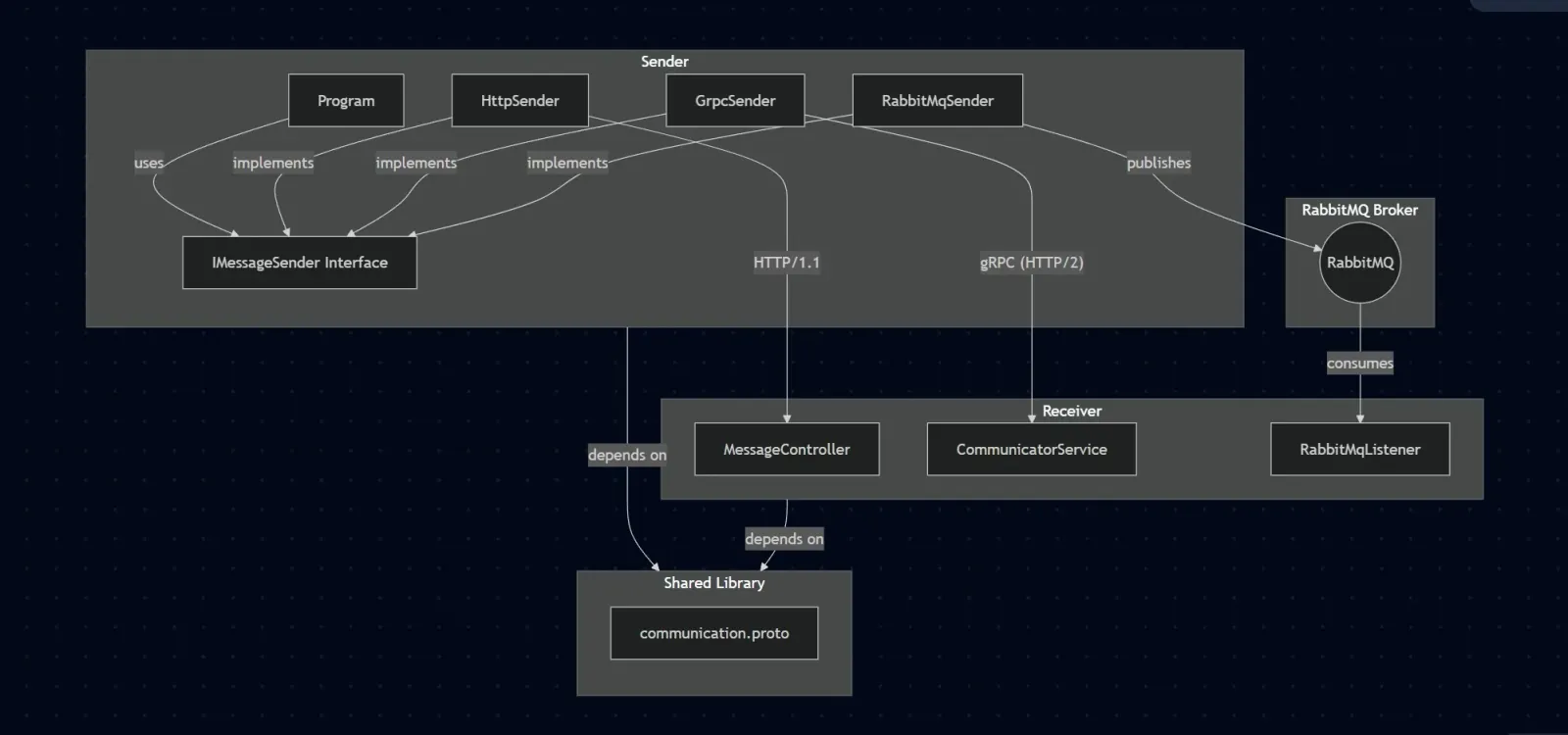
Before comparing numbers, define the boundary: client serialization, broker acceptance, server response, or end-to-end processing. Every path must satisfy the same relevant requirement.
Read the result within its limits
The original summary reported these timings in milliseconds:
| Path | Samples | Minimum (ms) | Maximum (ms) | Mean (ms) |
|---|---|---|---|---|
| gRPC / Protobuf | 13 | 1 | 114 | 10.62 |
| RabbitMQ | 15 | 0 | 53 | 3.53 |
| HTTP API | 15 | 1 | 19 | 2.20 |
The gRPC path contains a 114 ms outlier in only 13 samples. That observation warrants investigation; it does not identify the cause. Connection setup, JIT compilation, service initialization, scheduling, and other work are possible contributors.
The harness used whole-millisecond elapsed values, so a reported zero means the measurement rounded down at that resolution. It does not mean the operation took no time.
Separate hypotheses from evidence
Connection reuse is one factor worth checking. Microsoft's gRPC performance guidance explains why reusing a channel avoids repeated connection setup. That supports checking the client configuration; it does not prove that connection setup caused this particular outlier.
Likewise, a localhost test does not remove all transport, operating-system, or container overhead. It only describes one environment.
Design a more useful comparison
I would structure a follow-up around a specific decision:
- Use equivalent payloads, application work, and completion semantics.
- Measure cold-start behavior separately from steady-state behavior.
- Reuse clients and connections according to each library's intended lifecycle.
- Collect enough samples to inspect distributions and tail latency, with controlled concurrency.
- Include realistic network conditions, errors, timeouts, and recovery behavior.
Microbenchmarks can isolate serialization or allocation costs. A service-level load test is needed to understand concurrency, network behavior, and end-to-end latency. Neither should be used to answer a question outside its measurement boundary.
Choose for the system's requirements
These results do not establish a universal winner. The choice also depends on interoperability, schema evolution, streaming, coupling, delivery requirements, and operational complexity.
The useful outcome was a better question: what must this communication path guarantee, and how will I measure whether it meets that requirement?