Skip to content
4 min read

Stop Guessing, Start Testing: How to Mock Your WPF ViewModel Logic

Tired of wrestling with network calls and databases just to test a simple color change in your UI? Learn how to use dependency injection and a simple mocking strategy in your .NET WPF app to test your ViewModel logic instantly and reliably.

  • #wpf
  • #dotnet
  • #csharp
  • #testing
  • #architecture

We've all been there. You've written some clever UI logic in your ViewModel maybe a text field turns red when a value goes over a certain threshold, or a status icon changes based on a background service. Now it's time to test it. You launch the app, perform five clicks to get to the right screen, and then... you wait. You wait for the API call to finish, or for the database to return its result, just to see if your color changed correctly. What if the network is down? What if the test data on the server isn't quite right? It's slow, it's frustrating, and it's unreliable.

What if you could test every possible state of your ViewModel logic in seconds, without any external dependencies? In this post, I'll show you the exact strategy I used in a recent WPF project to do just that, using dependency injection and a simple but powerful mocking pattern.

The Core Idea: Programming to an Interface

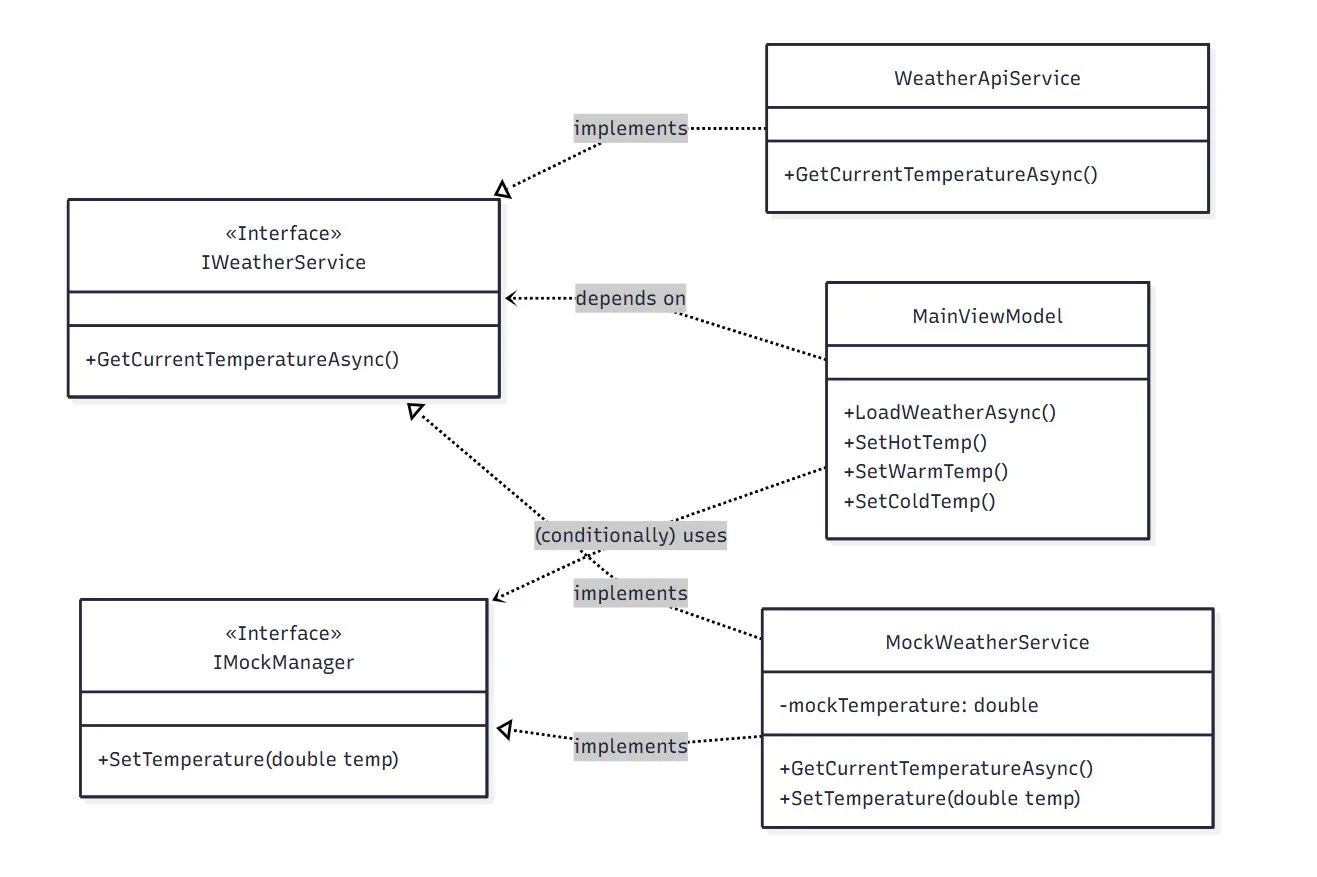
The secret to making our ViewModel testable is to decouple it from the 'real world.' Instead of letting our MainViewModel talk directly to a service that calls an API, we make it talk to an interface. In our example, this is the IWeatherService interface. An interface is like a contract; it defines what a service can do (e.g., GetCurrentTemperatureAsync), but not how it does it. This simple abstraction allows us to create two different implementations:

  1. A Real Service (WeatherApiService): This class talks to the actual external weather API over the internet.
  2. A Mock Service (MockWeatherService): This is a 'fake' class that we control. It doesn't call any APIs; it just returns whatever temperature we tell it to.

Our ViewModel doesn't know or care which implementation it's using. It just talks to the IWeatherService contract. This is the essence of the Dependency Inversion Principle, one of the pillars of SOLID design.

UML class diagram showing the MainViewModel depending on the IWeatherService interface, with WeatherApiService and MockWeatherService as implementations.
The ViewModel talks to an interface. It never sees the API.

Wiring It All Up: Dependency Injection

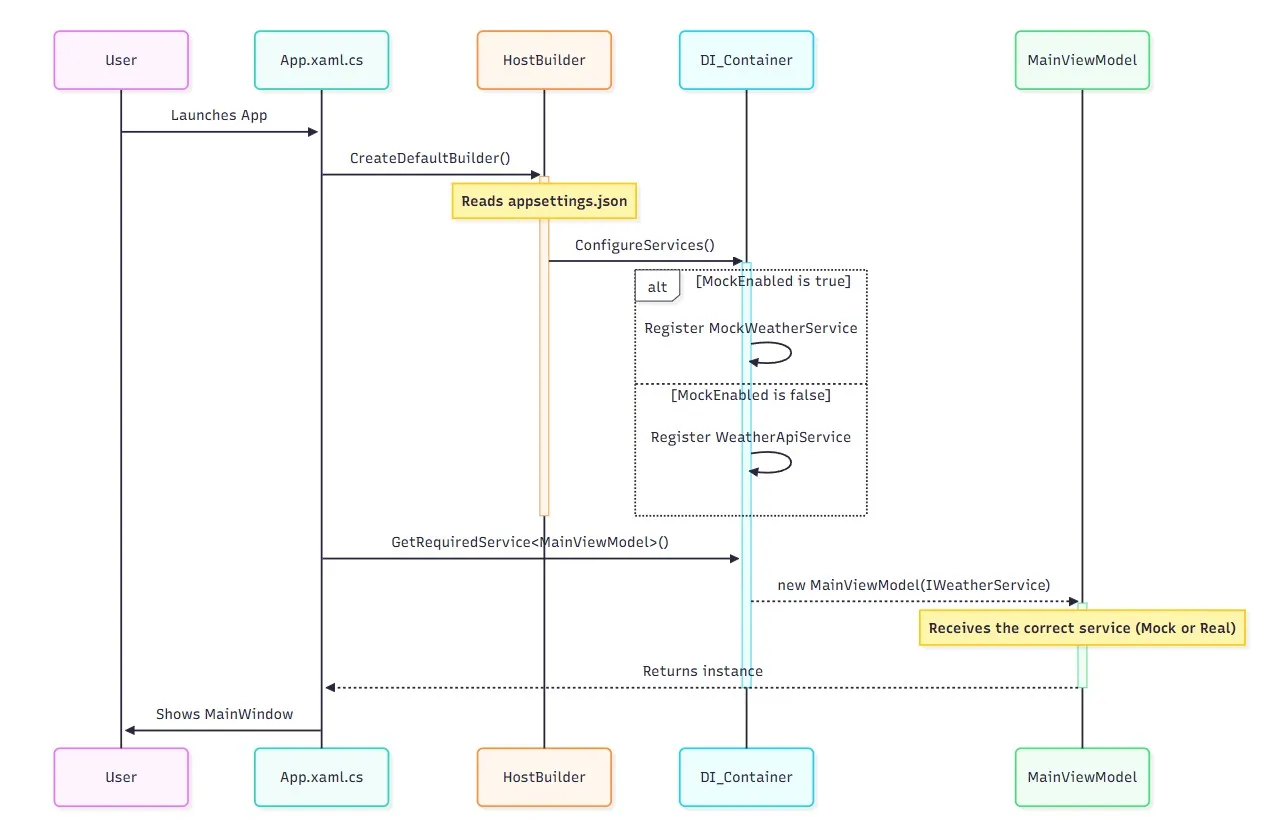
So, how do we tell our application which service to use? We use the modern .NET Host builder for Dependency Injection (DI). When the application starts, our App.xaml.cs reads a setting from appsettings.json. If MockEnabled is true, it tells the DI container to provide the MockWeatherService whenever something asks for an IWeatherService. If it's false, it provides the real WeatherApiService.

This decision happens at one single point when the app launches. The rest of our application, especially our ViewModel, remains blissfully unaware of the details. This setup is incredibly clean and follows the Single Responsibility Principle.

UML sequence diagram illustrating the application startup, showing the Host configuring services and injecting the chosen IWeatherService into the MainViewModel.
The host picks the implementation once, at startup. Nothing downstream knows which one it got.

The Payoff: The UI Tester

This is where the magic happens. Because we can control our MockWeatherService, we can add a special interface, IMockManager, that only the mock service implements. This interface has one job: SetTemperature(double temp). We then expose this functionality through a small 'UI Tester' panel in our main window that is only visible when we are in mock mode.

Now, testing our UI logic is instantaneous:

  • Want to test the 'hot' state? Click the 'Set Hot' button. The mock service is updated to return 35 degrees, the ViewModel re-fetches the 'weather,' and our temperature text instantly turns red.
  • Want to test the 'cold' state? Click 'Set Cold.' The text turns blue.

No waiting, no network calls, no unreliable external factors. We are testing only the logic within our ViewModel, which is exactly what we wanted to do. This creates a rapid and reliable feedback loop, making development faster and the final code more robust.

Conclusion: Build for Testability

Taking the time to architect your application with testability in mind from the start pays off immensely. By using interfaces and dependency injection, you can isolate your UI logic from the messy, unpredictable outside world. This not only makes your code cleaner and more maintainable but also makes the development process itself far more enjoyable. So next time you start a new WPF project, don't let your ViewModel talk directly to a concrete service. Give it an interface and unlock the power of mocking. You'll thank yourself later.

https://github.com/LiorSherbaty/UiMock link to the GitHub repository with the full code example.