
Designing Responsive Data Loading for Large Datasets
Balancing time to first useful result, memory usage, and cancellation with staged loading and data virtualization.
- #performance
- #dotnet
- #architecture
- #csharp
On a project that displayed large, layered image datasets, loading the entire dataset before rendering created long waits and high memory usage. The design needed to give users useful information early while keeping subsequent navigation responsive.
Define the performance problem
The initial path fetched the complete dataset and then rendered it. That was straightforward for small inputs, but it coupled time to first display with total dataset size.
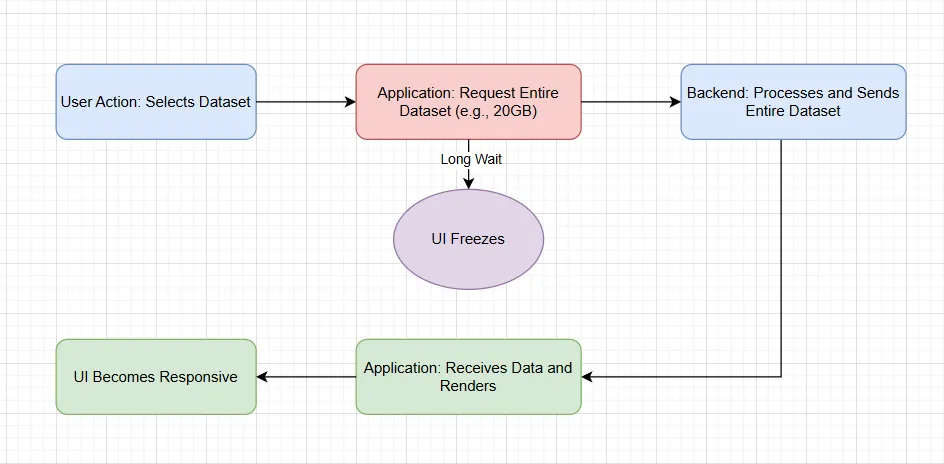
The design review focused on four separate concerns:
- First useful result: How soon can the user begin working?
- Responsiveness: Can the UI continue processing input during loading?
- Memory: How much data is retained as the user navigates?
- Correctness: Can an obsolete request overwrite the current selection?
Separating those concerns made the alternatives easier to evaluate. Faster downloading alone would not resolve excessive retention or stale results.
Combine staged loading with virtualization
The chosen approach had three stages: prepare the application shell, retrieve the first useful frame, and load additional data according to the user's current view.
Dynamic loading improves the initial experience. Data virtualization limits the working set by fetching what is needed and evicting what is no longer useful. Together, they require an explicit policy for prefetching, caching, and cancellation.
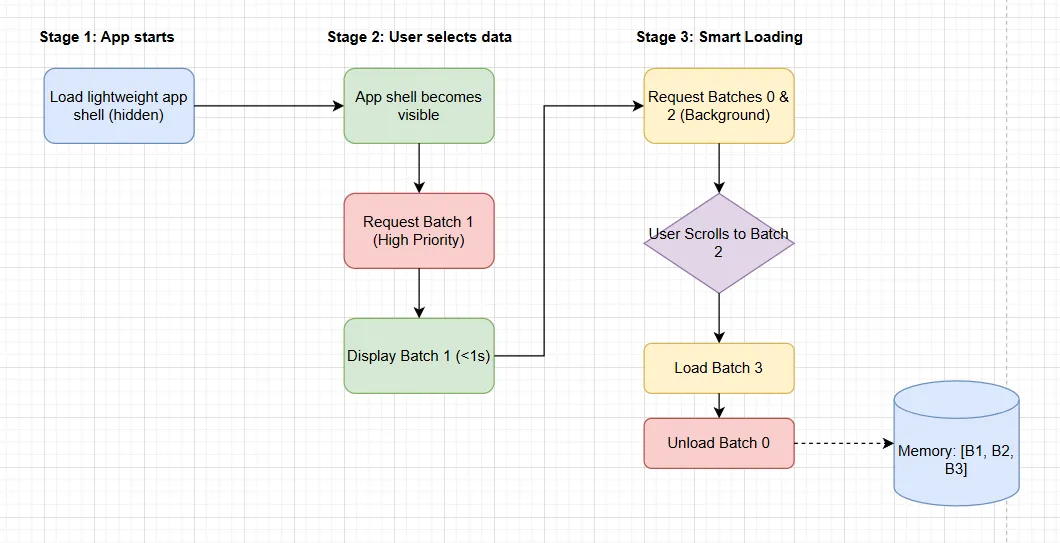
A useful implementation boundary is to separate fetching, decoding, caching, and UI updates. Each stage can then expose its cost and respond to cancellation without forcing the view to understand the entire pipeline.
Keep background work owned
Displaying an initial frame should not make the remaining work untracked. A coordinator should retain and observe loading tasks, cancel obsolete requests, and prevent results from an earlier selection from replacing the current view.
Asynchronous I/O should be awaited. CPU-intensive decoding may need bounded background execution, with updates marshaled to the UI thread. An async method name alone does not establish either behavior.
Reduce allocation pressure deliberately
Repeated large allocations can add garbage-collection cost. The Large Object Heap is collected with generation 2, so allocation volume and retained buffers matter when evaluating pauses. See Microsoft's Large Object Heap guidance.
ArrayPool<T> can reduce repeated allocation when buffers are reused, but renting can still allocate and the pool can retain large arrays. Pooling does not guarantee an allocation-free path.
The ownership rules are equally important: return a rented buffer in finally, use only the valid range, and ensure no decoder or asynchronous operation retains it after return. Clear data when the application's data-handling requirements call for it.
Verify the workload users actually have
A meaningful validation plan measures time to first frame, navigation latency, peak retained memory, and cancellation behavior. Include large datasets and rapid selection changes, then compare those results against an explicit budget.
This approach made the architecture easier to reason about: improve the first useful result, bound the ongoing work, and measure each stage before adding another optimization.